Persistent background music
2020/07/15
- Type
- Learning Resource
- Format
- Tutorial
- Version
- Godot 3.x
- Code
- MIT
- Game Assets
- CC BY-NC-SA
- All else
- 2016-2026, GDQuest© - All rights reserved
- Created
- Updated
- 2020/07/15
- 2020/07/15
Background music is one of the most immersive elements of a game. It dictates the mood and pace of a level or even of the whole playthrough, but there's a common mistake that may happen when we are working with background music in most game engines. When transitioning between game scenes, the music gets cut and it is common that it restarts from the beginning, completely breaking the immersion.
One of the simplest ways we can solve this problem is by using a Singleton responsible for playing the background music. Since singletons are accessible globally and there can only be a single instance of them, they can be used to maintain the music playing while all other objects are freed from memory between scene transitions.
In Godot Engine we can play audio stream files through an AudioStreamPlayer Node. We are going to use it and rename it as BackgroundMusic, alternatively you can already drag your music file to the Stream property slot and toggle on the Autoplay flag.
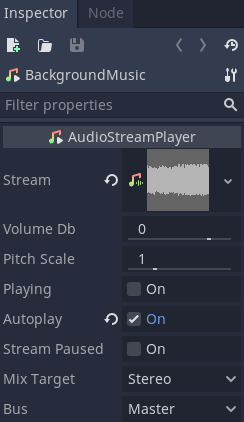
With that, we just need to turn this scene into an Autoload. In Godot Engine, an Autoload is a scene that is loaded automatically and instanced aside from the main scene, allowing it to be apart from changes in the SceneTree structure caused by the get_tree().change_scene and get_tree().change_scene_to methods. In other words, when calling one of those methods, an Autoload stays in the SceneTree processing normally.
Let's turn our BackgroundMusic into an Autoload now. In the Project > Project Settings > Autoload browse the BackgroundMusic file to set it as an Autoload.

Now whenever you test your game, the BackgroundMusic will instance alongside the scene you are testing and won't be removed unless you manually queue_free it, and with that our BackgroundMusic can keep playing throughout scenes.
audio/background-music directory.Don't stop here. Step-by-step tutorials are fun but they only take you so far.
Try one of our proven study programs to become an independent Gamedev truly capable of realizing the games you’ve always wanted to make.


Get help from peers and pros on GDQuest's Discord server!
20,000 membersJoin ServerThere are multiple ways you can join our effort to create free and open source gamedev resources that are accessible to everyone!
Sponsor this library by learning gamedev with us onGDSchool
Learn MoreImprove and build on assets or suggest edits onGithub
Contributeshare this page and talk about GDQUest onRedditYoutubeTwitter…
Site in BETA!found a bug?