We use two units in games for measuring angles: degrees and radians. In games and game engines, angles are usually measured in radians for efficiency.
You surely know what degrees are, but you may not be familiar with radians. However, they're just another unit of measurements. You're familiar with kilograms vs pounds, meters vs feet, degrees celsius vs farenheit; degrees vs radians is another example of different units expressing the same thing.
Degrees are based on the circumference of a circle. A circle is divided into 360 degrees.
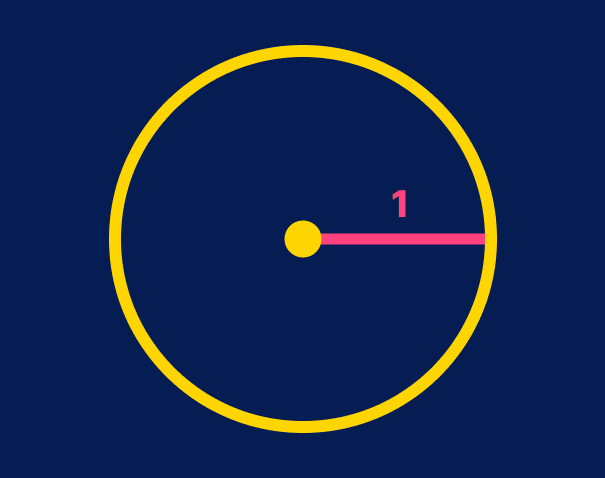
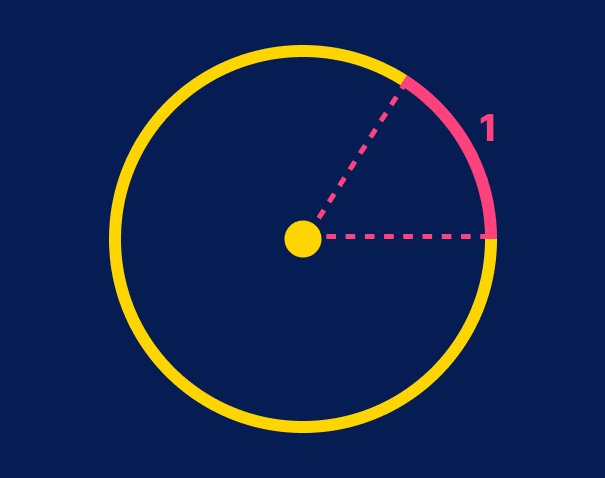
Radians are based on the radius of a circle. A radian is equal to the angle of an arc whose length is the circle's radius.
Imagine a circle with a radius of one unit.
If you wrap a string along the circle that is one unit long, the corresponding angle from the circle center is one radian.
Because the perimeter of a circle is 2π multiplied by the circle radius, and one radian corresponds to an arc as long as the radius of the circle, there are 2π radians in a circle.
You don't have to remember the technical explanation; the important part to remember is that
1π is half a circle, or 180˚.
2π is a full circle, or 360˚.
So to get, say, a 90° angle, you can divide π by 2. Once you get used to thinking of angles as fractions of circles, things get easier.
Here are common angles in degrees and radians:
360° = 2π radians
180° = π radians
90° = π/2 radians
45° = π/4 radians
30° = π/6 radians
If you prefer to use the number, you can approximate values by remembering that PI is roughly equal to 3.14, and multiplying or dividing that. With this said, you very rarely need to write the float in full; using fractions is enough.
In Godot, the constant is called PI, so you can use operations like PI / 4 or 2 * PI to determine angles.
Godot also uses the TAU constant, equivalent to 2 * PI: a full circle. In Mathematics, Tau is noted as τ. If you wanted, for example, an angle that is 1/10th of a circle, you may write TAU / 10 or PI / 5.
Converting to and from radians
Because we have a better intuitive feel for degrees, due to years of familiarity, you may prefer to use degrees. There are several ways of doing that in Godot.
First, you can use the functions deg_to_rad() and rad_to_deg() to convert to and from degrees and radians in code.
Second, many functions related to rotation, which by default use radians, have a ..._degrees equivalent. For example, to rotate a Node2DNode2D 180°, you may write node.rotation = PI, but you may also write node.rotation_degrees = 180. Check the documentation to see if there's an equivalent for the property or function you're setting that uses degrees.
Finally, you can export radians as degrees, so you can set degrees in the inspector, but still use radians in code:
This property will appear as degrees in your editor, and will allow to enter values from 0 to 360. But in code, the value will be radians, and you can use it as is in all properties and functions that expect radians.
Why do we use radians at all?
One reason is that it makes calculations related to angles and such simpler. Trigonometric formulas get simplified when using radians, which is faster for the CPU. The difference is extremely small, so you shouldn't care about it in your own code. However, when choosing a default for a game engine, picking the faster option, even if by a hair, makes sense.
The simplified formulas are also easier to read and to write, which makes calculating them less prone to errors when writing code.
It's also tradition: even if you didn't care about the above, almost all mathematical libraries will use radians by default.
Become an Indie Gamedev with GDQuest!in GDSchool
Don't stop here. Step-by-step tutorials are fun but they only take you so far.
Try one of our proven study programs to become an independent Gamedev truly capable of realizing the games you’ve always wanted to make.