The dot product of two vectors measures how much they point in the same direction or away from one another. It also tells you how much one vector reinforces the other.
Imagine a guard in a 2D game standing still. The guard is facing a specific direction, looking for the player. When you compare where the guard is looking with the direction to the player, the dot product tells you how well these two directions line up.
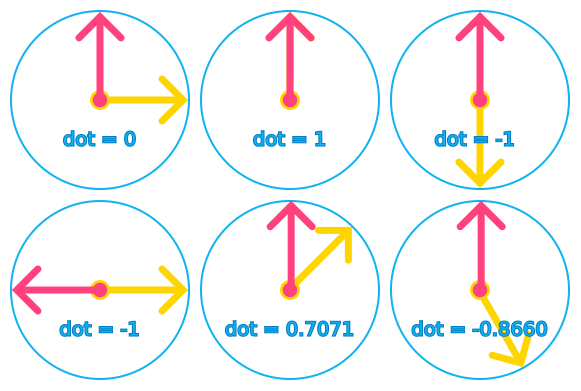
If the player is directly in front of the guard, right where the guard is looking, both directions match perfectly. The dot product gives you a high positive number. But if the player sneaks up from behind, the guard's look direction and the direction to the player point in opposite ways. Now the dot product is negative. When the player is exactly to the side, at 90 degrees from where the guard is looking, the dot product becomes zero. The guard's vision and the player's position don't overlap at all.
The dot product gives you a single number that measures this alignment. If it's positive, the two vectors point more or less in the same direction. If it's negative, they point in opposite directions. If the vectors are perpendicular, the dot product is zero.
Examples of dot product results between normalized vectors (both vectors have a length of 1)
In games, we use the dot product to:
Calculate forces and apply them in physics. For example, to add forces together or cancel them out
Calculate line of sight, like to determine if a mob sees the player
Know if something is in front of or behind an object
Calculate basic light and shadows in shaders
How to calculate the dot product
The dot product multiplies the matching components of two vectors and adds the results together. If you have two 2D vectors a and b, the formula is:
(a.x * b.x)+(a.y * b.y)
For example, if a is Vector2(1.0, 0) and b is Vector2(1.0, 0.5), their dot product is (1.0 * 1.0) + (0 * 0.5), which equals 1.0.
For 3D vectors, it's the same idea: you multiply and add all three components (x, y, and z).
In Godot, you can calculate the dot product by calling the dot() method on a vector: a.dot(b). The order doesn't matter: a.dot(b) is the same as b.dot(a).
You can also see the dot product in another way: it equals the product of the lengths of the two vectors multiplied by the cosine of the angle between them. This formula, |a| * |b| * cos(angle), gives you the same result as multiplying and adding the components. It's useful because it shows why the dot product measures alignment: when vectors point in the same direction, the cosine is 1 (maximum), when they're perpendicular, it's 0, and when they point opposite directions, it's -1 (minimum). That's where the positive, zero, and negative results come from.
NOTE:
In other words, if you're using normalized vectors, the dot product and the cosine of the angle between them are the same thing.
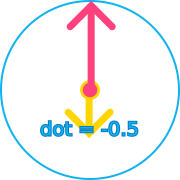
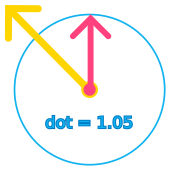
When the vectors are not normalized, the dot product still measures how much they point in the same direction, but you cannot directly compare it to a cosine value.
In this example, the vector pointing down is shorter than the vector pointing up. This leads to a smaller negative value.
Here, the vector pointing left and up is longer than the vector pointing up. This leads to a larger positive value.
Example: using the dot product in Godot
You can use the dot product to calculate line of sight, to know if two characters are facing each other, and more. That's because the dot product tells you if two vectors point in the same direction or away from each other. The following example comes from M4 in Learn 3D Gamedev From Zero and uses the dot product to give a mob a cone of vision.
class_name Mob
## The player character@exportvar player: Node3D
## The range at which the mob can see the player@exportvar vision_range :=7.0## The angle of the mob's vision cone@export_range(0.0,360.0,0.1,"radians_as_degrees")var vision_angle :=PI/4.0:
set = set_vision_angle
var _cos_max_angle_of_vision :=0.0funcset_vision_angle(value:float)->void:
vision_angle = value
_cos_max_angle_of_vision =cos(value)func_ready():# Ensure the setter has run and _cos_max_angle_of_vision is set
vision_angle = vision_angle
func_physics_process(delta):var distance := global_position.distance_to(player.global_position)if distance > vision_range:returnvar direction := global_position.direction_to(player.global_position)var dot_product := global_basis.z.dot(direction)var player_is_in_vision_cone := dot_product > _cos_max_angle_of_vision
if player_is_in_vision_cone:# ... do something about it
The dot product is also used in graphics rendering. For example, when shading, you can use it to calculate if each pixel on the surface of a 3D model faces towards or away from a light source and make the surface lit or in shadows. It's also used for rim light effects, where you brighten parts of a 3D surface that are perpendicular or face away from the camera direction.