Keyframe
2025/10/11
- Type
- Learning Resource
- Format
- Glossary Article
- Version
- General
- Subject Tags
- Code
- MIT
- Game Assets
- 2016-2026, GDQuest© - All rights reserved
- All else
- 2016-2026, GDQuest© - All rights reserved
- Created
- Updated
- 2026/10/21
- 2025/10/11
In computer animation, a keyframe represents a value we want to reach at a certain point in time for a given property.
In Godot, keyframes are part of an animation track, which controls the value of a given property over the length of the animation. They are represented by a little diamond icon in the Animation editor.
In this image, you can see some keyframes as part of an animation track. They animate the position property of a Sprite2D node.
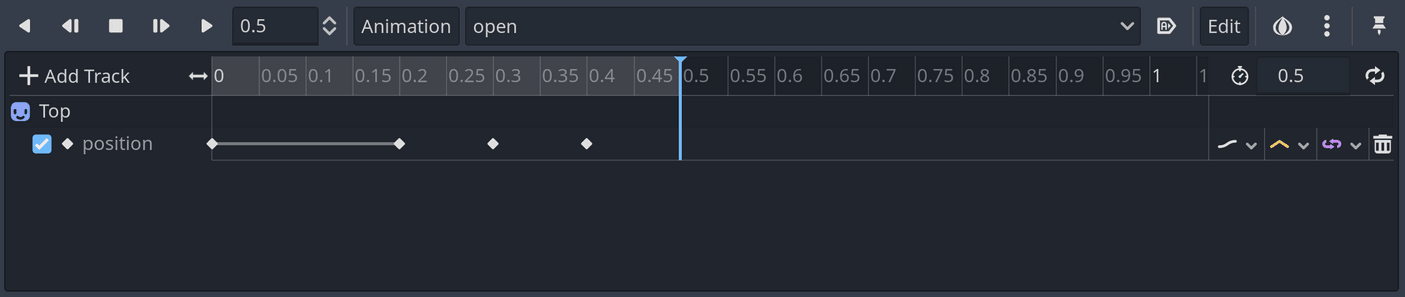
When playing an animation, the computer reads keyframes before and after the current playback time and interpolates between them: the computer calculates intermediate values between the two keyframes to produce a smooth animation.
Don't stop here. Step-by-step tutorials are fun but they only take you so far.
Try one of our proven study programs to become an independent Gamedev truly capable of realizing the games you’ve always wanted to make.


Get help from peers and pros on GDQuest's Discord server!
20,000 membersJoin ServerThere are multiple ways you can join our effort to create free and open source gamedev resources that are accessible to everyone!
Sponsor this library by learning gamedev with us onGDSchool
Learn MoreImprove and build on assets or suggest edits onGithub
Contributeshare this page and talk about GDQUest onRedditYoutubeTwitter…
Site in BETA!found a bug?