Declarative programming is a way of programming where you describe the result the code should produce without giving step-by-step instructions on how the computer should produce this result.
In Godot, creating scenes in the editor is a form of declarative programming, even though it is visual and done in the editor. A scene represents a node structure; you don't have to tell the engine exactly how to create each node or in which order to create them. Instead, the scene represents the final structure you want.
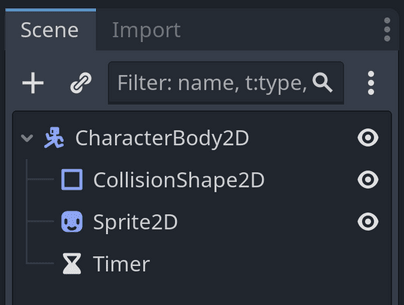
The following scene has four nodes: a CharacterBody2DCharacterBody2D node at the root, and child CollisionShape2DCollisionShape2D, Sprite2DSprite2D, and TimerTimer nodes. You don't have to write code to create these nodes, add them as children of one another, or set their properties. You just organize them and set their properties in the editor.
Imagine that you've changed a few properties in the editor, like the radius of the CollisionShape2DCollisionShape2D node, the texture of the Sprite2DSprite2D node, and the wait time of the TimerTimer node.
When you run the scene, the scene structure reproduced by Godot may be equivalent to running this code:
This code is imperative because it gives step-by-step instructions to create the nodes and add them as children of one another. When you use declarative code, there's always more code behind the scenes written in a different paradigm that makes it work.
In Godot, you can combine imperative and declarative programming styles. The GDScript programming language is mostly imperative and object-oriented, while the editor gives you tools that are like declarative programming.
You can also write declarative code in GDScript. There are built-in functions that describe a result rather than how to get it. For example, imagine you have an array of items in a player's inventory and you want to find all weapons. Here how you would filter and find them using a loop. This is imperative code:
Here is the declarative equivalent using the Array.filter() function:
var weapons := inventory.filter(func(item):return item.type == ItemTypes.WEAPON)
With the imperative code, you tell the computer step by step how to build the result:
Create an empty array
Loop over each item
Check a condition
Append matching items
With the declarative code, you describe the result you want: "a filtered version of the inventory containing only weapons." The filter() function handles the looping and appending for you internally (the imperative code still exists behind the scenes, it is just hidden from you).
Some languages are designed to be more declarative than others. SQL and Prolog, for instance, are highly declarative languages where you almost always describe the result you want and let the language figure out how to compute it.
Become an Indie Gamedev with GDQuest!in GDSchool
Don't stop here. Step-by-step tutorials are fun but they only take you so far.
Try one of our proven study programs to become an independent Gamedev truly capable of realizing the games you’ve always wanted to make.