Scope
2026/07/22
- Type
- Learning Resource
- Format
- Glossary Article
- Version
- General
- Subject Tags
- Code
- MIT
- Game Assets
- 2016-2026, GDQuest© - All rights reserved
- All else
- 2016-2026, GDQuest© - All rights reserved
- Created
- Updated
- 2026/10/21
- 2026/07/22
The variables and functions we write in our code exist and are accessible in a limited portion of the code. We call the area where they're accessible the scope.
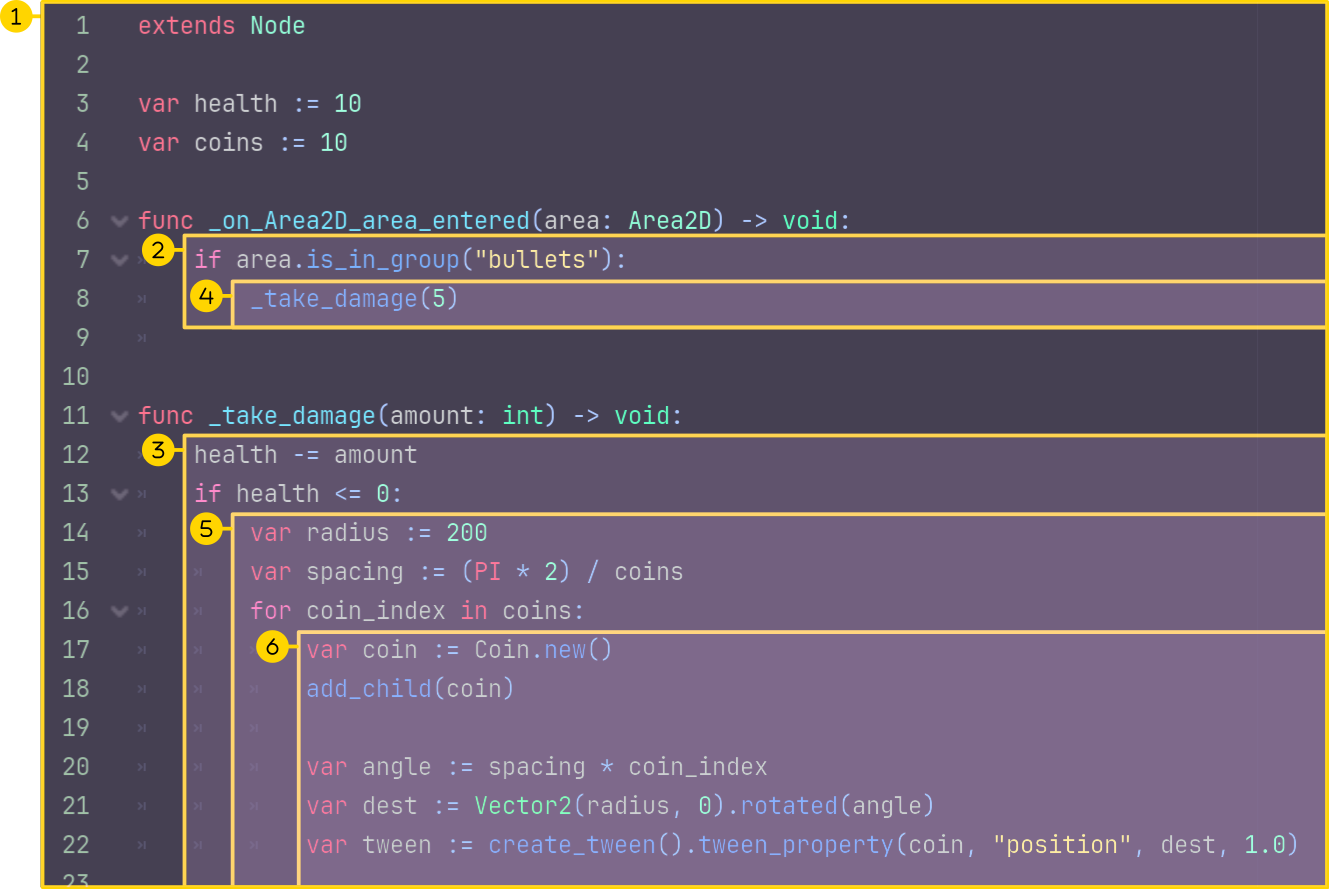
In the image above, there are 6 scopes:
1 is the class scope, where the variables health and coins are defined, as well as the two functions.2 and 3 are the local scopes of the _take_damage() and _on_Area2D_area_entered() functions.4 and 5 are the local scopes of two if blocks.6 is the local scope of the for loop.Any function or variable in a narrower scope has access to all variables in wider scopes. But variables created within a narrower scope are not accessible from wider scopes. They are created within the block and are destroyed when the block ends.
One exception in GDScript is if you define a variable at the top of a script; then it is available not only throughout the script but also from other scripts.
We can access a class member variable in any function. For example, we can access the health variable in the heal() function below.
var health := 100.0

func heal(healing_amount: int) -> void:
    health += healing_amount
But if we define a variable in a function, it is only available in the function after the variable's definition. We say that the scope is local to the function.
In the following example, the direction variable only exists in the _process() function. The variable gets created anew each time the function runs (once per frame) and is deleted when the function ends.
func _process(delta: float) -> void:
    var direction := Vector2(0, 0)
    direction.x = Input.get_axis("move_left", "move_right")
    direction.y = Input.get_axis("move_up", "move_down")
The scope can be even narrower: if you define a variable in an if block or a for loop, it exists only when this code block runs and within this code block.
Below, the variable item only exists within the for loop. It gets created and deleted in each iteration of the loop.
func spawn_items() -> void:
    for current_index in range(3):
        var item := preload("Item.tscn").instantiate()
add_child(item)No, the use of local variables doesn't significantly impact performance. The creation and deletion of local variables are fast operations. You can generally use local variables without worrying about performance. Many other operations in your code will have a much more significant impact on performance.
var health := 100.0

func take_damage(health: float) -> void:
    print(health)
In this example, the parameter health shadows the variable health in the take_damage() function, because they have the same name. Inside the function, the external parameter health is not accessible anymore.
Godot will warn you when you shadow a variable. It is preferable to not do this, because it can lead to confusion. But if you did want to do that, and need access to the external variable, you can use the self keyword.
var health := 100.0

func take_damage(health: float) -> void:
print(self.health)Don't stop here. Step-by-step tutorials are fun but they only take you so far.
Try one of our proven study programs to become an independent Gamedev truly capable of realizing the games you’ve always wanted to make.


Get help from peers and pros on GDQuest's Discord server!
20,000 membersJoin ServerThere are multiple ways you can join our effort to create free and open source gamedev resources that are accessible to everyone!
Sponsor this library by learning gamedev with us onGDSchool
Learn MoreImprove and build on assets or suggest edits onGithub
Contributeshare this page and talk about GDQUest onRedditYoutubeTwitter…
Site in BETA!found a bug?