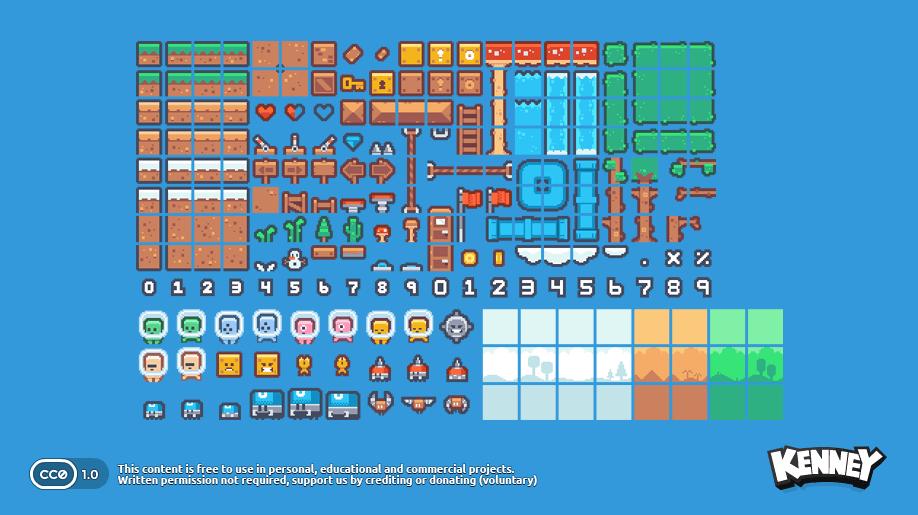
A sprite sheet is a single image file containing multiple smaller images (sprites) arranged in a grid-like pattern (the sheet). It's a common technique in game development for efficiently storing and managing multiple related art assets like animation frames, tiles for level design, or multiple sprite variations.
This spritesheet by Kenney.nl packs character, environment assets, and user interface elements into a single file:
Rather than loading many individual image files, a sprite sheet allows the game engine to load just one file and then display specific regions of it as needed.
This approach was traditionally used to improve performance and memory usage by packing multiple assets into one file, decreasing the number of file loading operations.
This is still used today for flipbook-like animations: artists arrange consecutive frames in rows and columns, which makes it easy to cycle through them and create fluid movement.
In Godot, two nodes support sprite sheets:
The Sprite2DSprite2D node, with its AnimationHframes and AnimationVframes properties
The AnimatedSprite2DAnimatedSprite2D node, which has a dedicated editor tool to slice sprite sheets into individual frames and set up animations with a bit more control
Become an Indie Gamedev with GDQuest!in GDSchool
Don't stop here. Step-by-step tutorials are fun but they only take you so far.
Try one of our proven study programs to become an independent Gamedev truly capable of realizing the games you’ve always wanted to make.