Local Multiplayer Input
2020/07/25
- Type
- Learning Resource
- Format
- Tutorial
- Version
- Godot 3.x
- Subject Tags
- Code
- MIT
- Game Assets
- CC BY-NC-SA
- All else
- 2016-2026, GDQuest© - All rights reserved
- Created
- Updated
- 2020/07/25
- 2020/07/25
A common mistake when coding player movement is using constants for the inputs. For instance:
export var speed := 600.0
export var direction := Vector2.ZERO

var _velocity := Vector2.ZERO

func _process(delta: float) -> void:
  update_direction()
  _velocity = direction * speed
  translate(_velocity * delta)


func update_direction() -> void:
	direction.x = Input.get_action_strength("move_right") - Input.get_action_strength("move_left")
	direction.y = Input.get_action_strength("move_down") - Input.get_action_strength("move_up")
Note that all the "move_*" checks are constants. Here the Player.gd class always reacts to the same inputs, which leads to one player controlling both players' characters:
In this mini-tutorial, you'll learn a quick fix for that.
Using constants means we can't change the reference to input actions and prevents us from checking for different inputs on instances of the Player.gd class.
To solve that, we need to check for variables instead. We can export the input variables to be able to set them through the Editor.
export var move_right_action := "move_right"
export var move_left_action := "move_left"
export var move_down_action := "move_down"
export var move_up_action := "move_up"
In the update_direction() method, we check for these variables instead of constants:
func update_actor_direction() -> void:
	_actor.direction.x = Input.get_action_strength(move_right_action) - Input.get_action_strength(move_left_action)
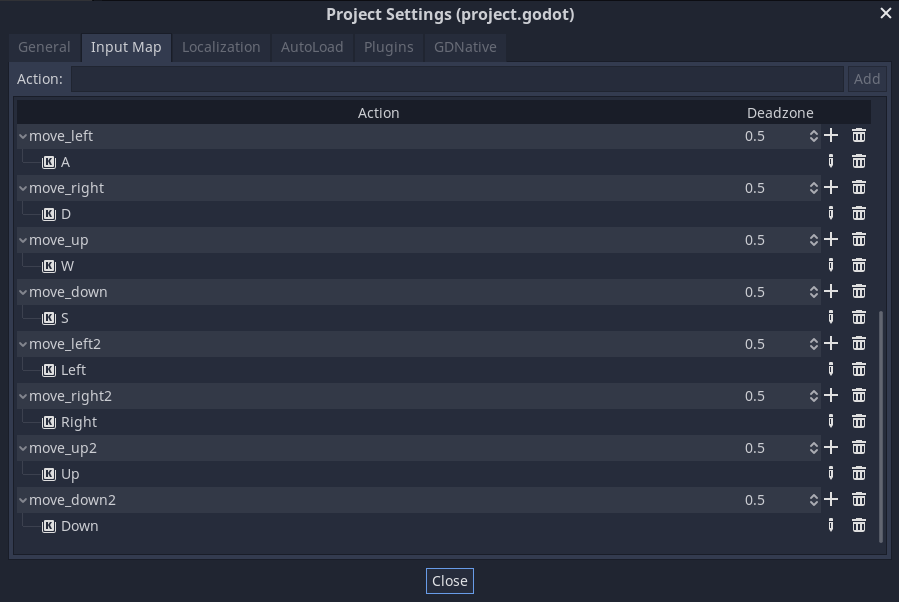
_actor.direction.y = Input.get_action_strength(move_down_action) - Input.get_action_strength(move_up_action)We create the Player 2 controls in the Project > Project Settings > Input Map. In our demo project, we added the suffix 2 to differentiate them from Player 1's actions.
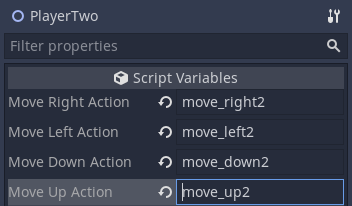
It's important when creating an instance of the Player.tscn scene that we update the actions to Player 2's.
Now we have independent player characters.
Note that you can extend this approach to any number of local players. You just need to set their actions in the Input Map and match them on their characters instance. The same approach works for jump, shoot, hold, throw, and any other player action.
Don't stop here. Step-by-step tutorials are fun but they only take you so far.
Try one of our proven study programs to become an independent Gamedev truly capable of realizing the games you’ve always wanted to make.


Get help from peers and pros on GDQuest's Discord server!
20,000 membersJoin ServerThere are multiple ways you can join our effort to create free and open source gamedev resources that are accessible to everyone!
Sponsor this library by learning gamedev with us onGDSchool
Learn MoreImprove and build on assets or suggest edits onGithub
Contributeshare this page and talk about GDQUest onRedditYoutubeTwitter…
Site in BETA!found a bug?