Godot can't find my node! Fixing null reference errors
If you have worked with Godot for a bit, you have probably seen this error (or something similar):
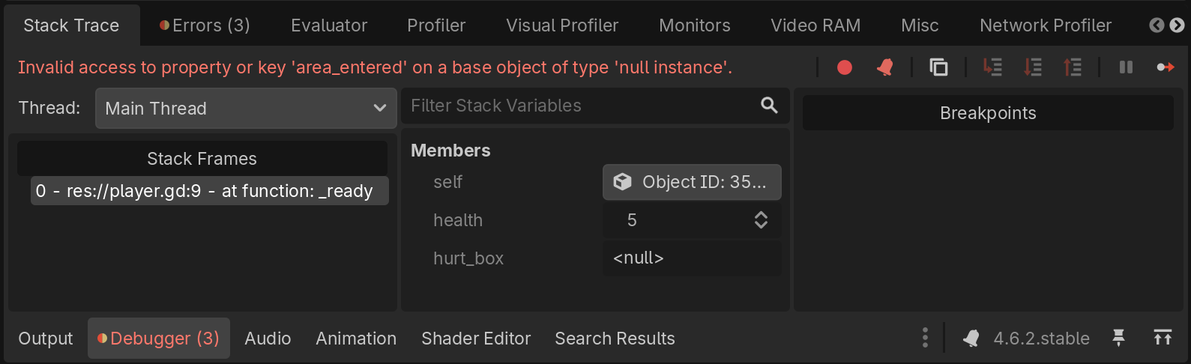
Invalid access to property or key 'area_entered' on a base object of type 'null instance'.
It's one of the most common errors beginners encounter in their first weeks using Godot, and the good news is that it's usually quick to fix once you know what to look for.
This error happens when your code tries to access member variables or functions on a node that doesn't exist or can't be found. Godot can't run the code you ask because there's nothing to act on.
This is what the error looks like in practice:
Why does it happen?
One common cause is that Godot cannot find a node you are trying to access with get_node(). When this happens, get_node() returns null instead of a reference to the node. The value null means "nothing."
When your code tries to access a member variable (property) or a member function (method) through that value, Godot cannot do that. It pauses the game and reports a "null instance error" in the debugger because null has nothing the engine can access.
Nathan
Founder and teacher at GDQuest
To become independent in your own projects, it's essential to learn how to understand the meaning of errors and trace back to their root cause. Without that, you will be unable to make progress without relying on tutorials.
In this study guide, you will learn how to:
Understand what causes the error.
Troubleshoot the 5 most common causes and solutions for this error.
As you go through this, keep in mind that debugging is a series of reflexes that you build and hone like muscle memory. That said, let's dive into what causes the null instance error and how to fix it.
Understanding what triggers the error
Let me show you exactly what the error looks like in practice. Here's a simple scene with a player character to help me demonstrate this issue.
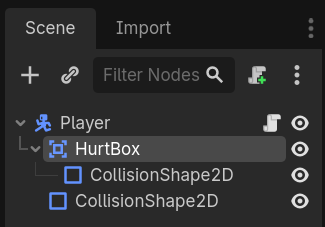
In this Player scene, there is a child Area2DArea2D node I've renamed "HurtBox" that I need to access in the script:
Here's the script I have attached to the Player node:
extendsCharacterBody2Dvar health :=5@onreadyvar hurt_box: Area2D =get_node("Hurtox")func_ready()->void:
hurt_box.area_entered.connect(func(area_that_entered: Area2D)->void:
health -=1)
See that typo? I wrote get_node("Hurtox") in the script, but in the Scene dock, the node is named "HurtBox". The code is just missing one letter, but it's enough to break everything!
Nathan
Founder and teacher at GDQuest
When Godot runs this code, here's what happens:
Godot calls the get_node() function and looks for a direct child of the player node named exactly "Hurtox".
Since there's no node with that exact name, the get_node() function returns null. Most programming languages have a special null value or object. It represents "nothing," a missing value, a reference that points nowhere in the computer's memory (we also call that a "null reference" or "null pointer").
The null value gets assigned to the hurt_box variable, which now points to null instead of a reference to the actual "HurtBox" node.
When Godot executes the line hurt_box.area_entered.connect(), it evaluates hurt_box ("replaces" the variable with its actual value), null, and tries to run null.area_entered.connect().
Godot throws an error because null doesn't have any member variables, functions, or signals. It doesn't have an area_entered signal and Godot tells you there's an error.
When you get a node in code, you have to pass the exact name or path to the node when calling the get_node() function. It has to match the names in your Scene dock exactly or Godot will not find the node you're trying to get.
In this case, it must be "HurtBox" and not "hurtbox" or "Area2D" or "Hurtbox" or anything else. Capital and lowercase letters have to match perfectly.
We saw one case in which this error can happen. In the next section, I'll walk you through the other common causes and show you how to fix each one.
Nathan
Founder and teacher at GDQuest
Troubleshooting checklist
When Godot stops the project because of a null instance error, you can use this checklist to find and fix the issue. I've ordered these from the most common to the least common causes.
There are 5 common causes of this error:
Having a typo in the node name
Using the node type instead of the node name
Writing an incorrect node path (when the node is not a direct child)
Using % when a node does not have a scene unique name
Renaming a node without updating the code
Having a typo in the node name
The problem: You typed the node name incorrectly when trying to access it. This is by far the most common cause.
Why this happens: Node names are case-sensitive and must match exactly. Even player vs Player will cause this error.
How to fix:
The safest way to avoid typos is to let Godot write the node path for you. Here are a few options to do this.
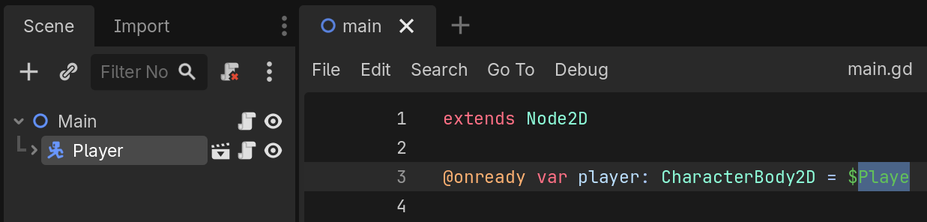
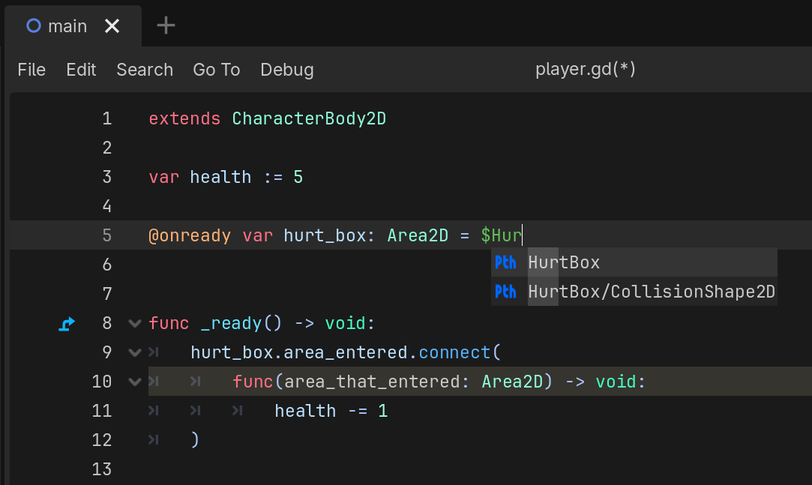
When you start typing the $ symbol followed by a few letters, Godot should show you a list of matching node names from the Scene dock. You can select the correct one from the dropdown to avoid typos.
NOTE:
If you're not seeing autocomplete suggestions, make sure code completion is enabled by checking the Editor SettingsGeneralText EditorCompletionCode Complete Enabled setting.
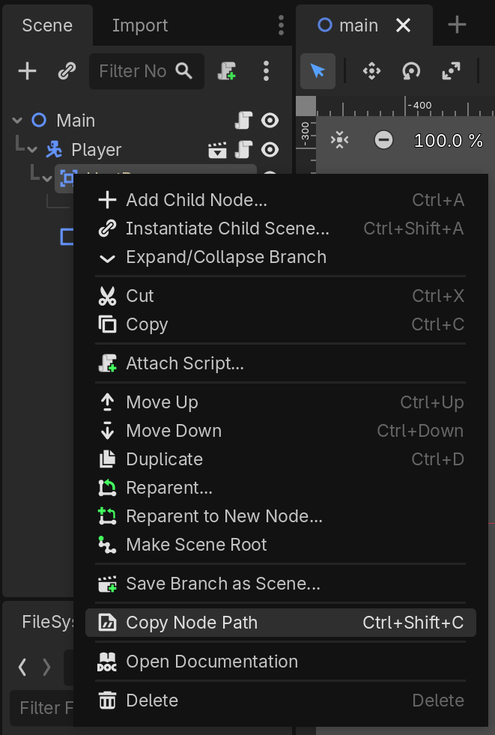
Another option is to copy the node path directly from the Scene dock. This is especially useful if you have a long path to the node (like $Enemies/Enemy/HurtBox) that would be easy to mistype. Right-click the node in the Scene dock and select "Copy Node Path" to get the exact path to paste into your script:
Yet another option is to hold down Ctrl while clicking and dragging the node from the Scene dock directly into your script:
This automatically creates an @onready variable with the correct path. You can't make typos then!
Using the node type instead of the node name
The problem: You're trying to get a node by its class type (like "Timer" or "Area2D") instead of its actual name in the scene.
Why this happens: When you add a node to a scene, Godot gives it a default name based on its type ("Timer", "Area2D", etc.). But you often rename these nodes to be more descriptive. The get_node() function searches by the name you see in the Scene dock, not by the node type.
How to spot it: Check if your code uses generic type names like this:
@onreadyvar timer =$Timer@onreadyvar area =$Area2D
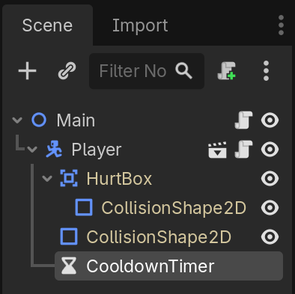
Godot is searching for a node named exactly "Timer" for the timer variable, and exactly "Area2D" for the area variable. It's not looking for any node of type TimerTimer or Area2DArea2D. But in your Scene dock, those nodes might have specific names like "CooldownTimer" or "HurtBox":
How to fix:
Use the actual name from the Scene dock. If the timer node is named "CooldownTimer" in the scene, your code needs to be:
@onreadyvar timer =$CooldownTimer
Writing an incorrect node path (the node is not a direct child)
The problem: You're using $NodeName syntax, but it turns out NodeName isn't a direct child of the node with the script you're currently editing.
Why this happens: When you pass a simple node name to the $ symbol (like $Enemy), Godot considers only direct children of the node with the script attached. If the node is nested deeper in the scene tree, you need to type the complete path through all parent nodes.
How to spot it: Look at your Scene dock structure. If there are other nodes between your script's node and the target node, you need the full path.
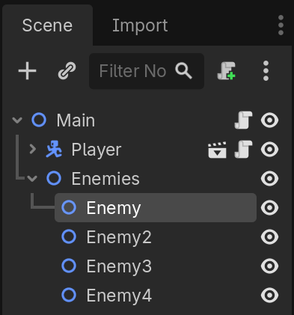
In this example, if you're editing the script attached to the Main node and you write:
@onreadyvar enemy =$Enemy
Godot looks for a direct child named "Enemy", but can't find it because "Enemy" is actually a child of "Enemies".
How to fix:
Use the full path to reach nested nodes:
@onreadyvar enemy =$Enemies/Enemy
Using % when a node does not have a scene unique name
The problem: You're using the % syntax to get a node, but you haven't marked that node as having a scene unique name.
Why this happens: The % syntax is a special feature that lets you access nodes from anywhere in a scene, regardless of their position in the tree. But it only works for nodes you've explicitly marked with a scene unique name. Without enabling this option for the node, Godot doesn't know to make the node available through the % syntax.
How to spot it: Your code uses % like this:
@onreadyvar health_bar =%HealthBar
But you get a null instance error even though a node named "HealthBar" exists in your scene.
How to fix:
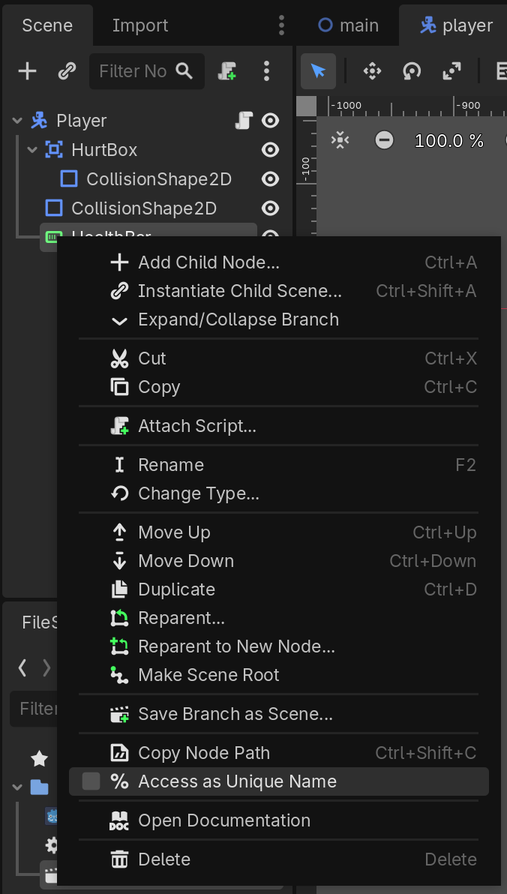
Right-click the node in the Scene dock and select "Access as Scene Unique Name":
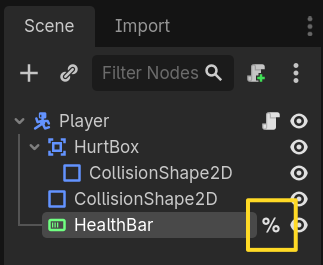
After setting it, you'll see a % icon next to the node name:
Now your %HealthBar reference will work from anywhere in the scene.
NOTE:
Unique names are scoped and only work within one scene. You cannot access a node using a unique name with % from outside this scene instance. In other words, you couldn't access this "HealthBar" node from outside the Player scene by calling get_node("%HealthBar") or equivalent.
Renaming a node without updating the code
The problem: You renamed a node in the Scene dock but forgot to update your script references.
Why this happens: Godot doesn't automatically update your code when you rename nodes in the Scene dock. The connection between your script and the scene is just through text, so changing the node name breaks all existing references until you update them manually.
How to spot it: You recently renamed a node to make it clearer (like changing "Marker2D" to "PlayerSpawner"), but now you're getting the null instance error.
How to fix:
After renaming any node, search for all references in your code:
Press Ctrl+Shift+F (or Cmd+Shift+F on macOS) to open the "Find in Files" dialog.
Search for the old node name.
Update each reference to use the new name.
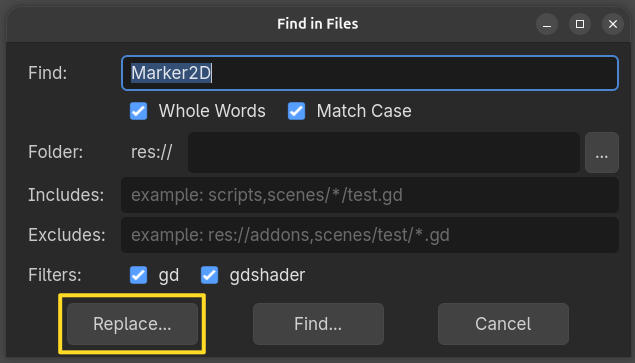
First, I search for "Marker2D" in the Find in Files dialog to find all the places I need to update after renaming the node to "PlayerSpawner".
I make sure to click the Replace... button, so I get the option of replacing the text from the results panel.
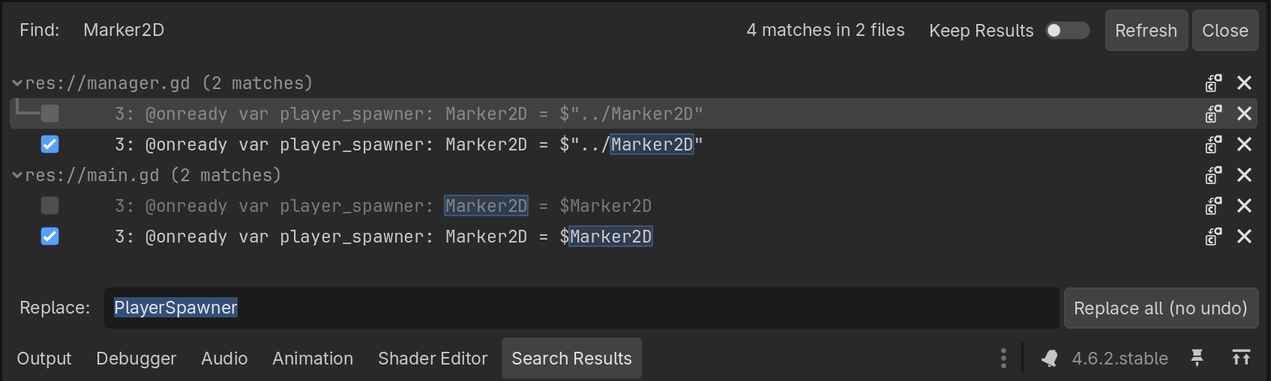
See how I toggled off replacing some of the results? That's because I used types in my code, like var player_spawner: Marker2D. We don't want to replace those; otherwise, we would break the code.
An issue with this method is that you have to uncheck all the irrelevant results manually if you're using types in your code. And, as you can see from the Replace all (no undo) button... there's no undo for this operation. Yikes! If you have a large codebase, this brings more problems than it solves. You're better off organizing your scenes upfront as you make them.
Questions and troubleshooting
What is @onready and how is it used?
When you create a variable that references a node, you need to wait for the scene tree to be ready before accessing it. The @onready annotation tells Godot to wait until the node and its children are added to the scene tree and have finished running their _ready() function before getting the node reference.
Without @onready, your code runs before the scene tree is ready, and the node isn't exposed yet, which leads to the variable pointing to null:
extendsNode2Dvar player =$Player
The line var player = $Player runs immediately when the script is loaded, before other nodes have been created and added to the game's scene tree, and player will be assigned null. This leads to the null instance error when you try to use player later in the code.
Adding @onready fixes this by telling Godot to wait:
extendsNode2D@onreadyvar player =$Player
This is a shortcut that's equivalent to writing:
extendsNode2Dvar player = null
func_ready()->void:
player =$Player
If you're getting a null instance error and none of the checklist items above apply, check that all your node references use @onready or that you are getting nodes in the _ready() function.
updates / code patches
This study guide was originally made with Godot 4.6 and was updated to Godot 4.7. Suggest an update.
Take your understanding of code to the next levelin GDSchool
Your ability to read and understand errors, debug your code, and implement mechanics on your own is part of the core skills you need to become independent and not depend on tutorials. In Module 6 of Learn 2D Gamedev From Zero, you learn to use the code reference and Godot's debugging tools and use them to implement your first mechanics on your own. In Module 10, you create an entire game by yourself without step-by-step tutorials.