Cutting sound effects
2020/07/14

- Type
- Learning Resource
- Format
- Tutorial
- Version
- Godot 3.x
- Code
- MIT
- Game Assets
- CC BY-NC-SA
- All else
- 2016-2026, GDQuest© - All rights reserved
- Created
- Updated
- 2020/07/14
- 2020/07/14
When dealing with sound effects, it is a common problem to have the audio cut when picking collectibles like coins, hearts, or when killing enemies.
Sound effects stop because we often free the node that's playing the sound indirectly. For instance, when the player touches a coin, we call queue_free() on the Coin node. The Coin contains an AudioStreamPlayer that gets removed from the game before it finishes playing the "picked" sound effect.

To solve that, we can use an AnimationPlayer. Godot's animation system allows us to sequence audio, animations, and to call functions using as many animation tracks as we want.
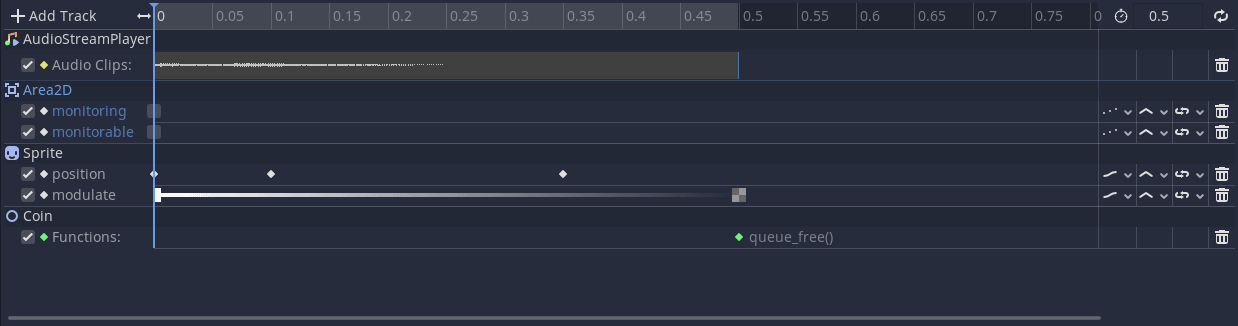
In the picture above, you can see we're calling queue_free() only at the end of the animation after the sound finished playing.
With this approach, we can also disable collision shapes and avoid triggering a queue_free() or any unexpected behavior, like a character dying twice or picking a coin or a power-up more than once.
Using animation, we can also see the duration of a sound effect using an Audio Playback Track, which allows us to use a Call Method Track to call the queue_free method when the sound effect finishes playing.
For example, let's make a coin that we pick up when clicking on it. Once picked, the coin performs an animation, plays a sound, and fades on the screen. Then we call its queue_free() method.
Here is the Coin scene setup:
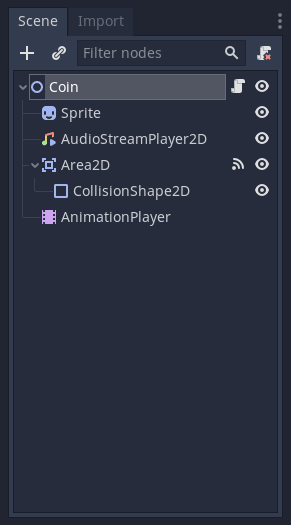
We have the following signals from the Area2D connected to the Coin node:
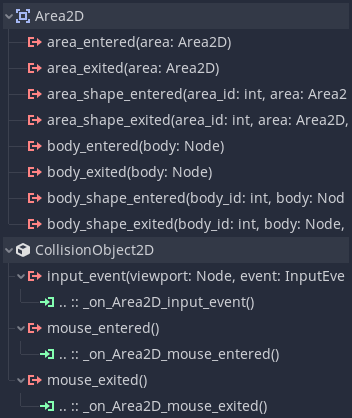
For the Coin script, it reacts to the Area2D signals. It gets brighter when the mouse enters the Area2D. It turns back to its default Modulation when the mouse exits, and it plays the Picked animation if we left-click inside the Area2D.
extends Node2D
class_name Coin


onready var animation_player := $AnimationPlayer
onready var sprite := $Sprite


func _on_Area2D_mouse_entered() -> void:
	sprite.modulate = Color(1.2, 1.2, 1.2)


func _on_Area2D_mouse_exited() -> void:
	sprite.modulate = Color.white


func _on_Area2D_input_event(viewport: Node, event: InputEvent, shape_idx: int) -> void:
	if event.is_action_released("left_click"):
		animation_player.play("Picked")
The critical part is the Picked animation. Let's break it down:
First, we add an Audio Playback Track that uses the AudioStreamPlayer to play the Coin.ogg sound. Then we disable the Area2D > Monitoring and Monitorable properties to prevent it from detecting any mouse events. In parallel, we animate the Sprite > Position and Modulation to give players visual feedback. Doing so shows that the coin was picked.
Then we have a Call Method Track with a keyframe on the very end of the animation calling the queue_free method on the Coin object, ensuring it gets removed from the SceneTree after the sound effect and visual animation finish.
audio/pickup-sound-effect directory.Don't stop here. Step-by-step tutorials are fun but they only take you so far.
Try one of our proven study programs to become an independent Gamedev truly capable of realizing the games you’ve always wanted to make.


Get help from peers and pros on GDQuest's Discord server!
20,000 membersJoin ServerThere are multiple ways you can join our effort to create free and open source gamedev resources that are accessible to everyone!
Sponsor this library by learning gamedev with us onGDSchool
Learn MoreImprove and build on assets or suggest edits onGithub
Contributeshare this page and talk about GDQUest onRedditYoutubeTwitter…
Site in BETA!found a bug?