Best practices with Godot signals
2026/04/04
- Type
- Learning Resource
- Format
- Study Guide
- Version
- Godot 3.x
- Subject Tags
- Code
- MIT
- Game Assets
- CC BY-NC-SA
- All else
- 2016-2026, GDQuest© - All rights reserved
- Created
- Updated
- 2021/03/30
- 2026/04/04
This lesson discusses some good practices to follow and pitfalls to avoid when using signals in Godot.
Signals are Godot's version of the observer pattern: they allow a node to send out a message that other nodes can listen for and respond to.
Emitting a signal instantly triggers a callback on connected nodes, so you can also use it as a delegation mechanism. You also get to use them with coroutines and the yield keyword: you wait for a signal to know when another object has finished processing.
Signals are an essential feature in Godot. They're not costly, performance-wise, as you'll see in a moment, and they help decouple classes or react to specific events in the game. They're really useful.
However, as a project grows, the number of signals and connections you use grows too. If you connect nodes every which way, you can end up with a maze that'll end up slowing you down.
If you've got some experience with Godot already, you should've seen quite a few use cases for signals.
Here, we're going to talk about when not to use them.
In the team, we apply some rules of thumb to keep the code and connections manageable:
Sending signals to nodes in distant node branches can make it hard to track down the connection in the code. Depending on your scene structure, you may need to "bubble up" the signal. That is to say, to have parent nodes re-emit and forward a signal from a child node. And you end up having to open three or four files just to follow the connection's path.
Imagine a game where the player character has a Health node to represent and manage its current health. In the user interface, a bar named UILifeBar displays the stat's current value.
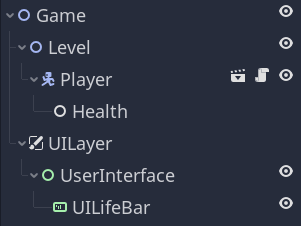
Every time the health changes, you want to update the bar. But you don't want to store a reference to the Health node on the UILifeBar, which would tightly couple the two objects.
Instead, you would likely use a signal to notify the bar when the health changed. But in the scene above, the nodes are distant from one another. You can also see that Health is "encapsulated" in the Character scene that's saved in the level scene. In the simplified scene tree above, it looks like you could just connect the nodes in the editor.
But imagine it's a real-world project with hundreds of nodes, where it's not so simple. In that case, and to keep the code flexible, you may think of forwarding signals like so:
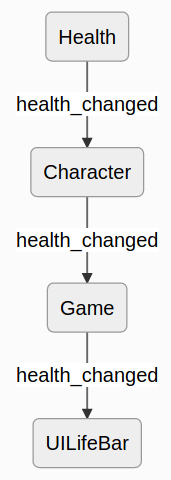
That's three emissions and connections to track down.
Instead, you could use one of the following alternatives:
When you need many steps to connect two nodes, like passing a reference around several times, you get an issue similar to the previous one. While you don't need to open multiple files to track down the signal emission, you still need that to track down the initialization and connection.
When that is the case, you can favor the second solution mentioned above over the first one: using a global "Events" singleton that any node can connect to in one step.
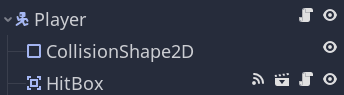
Another option is to use the physics engine to detect interactions. The area nodes are great for detecting when two objects come into contact in the game world using their body_entered and area_entered signals.
The groups feature can also be a helpful tool. Imagine that in a game level, you have seven unique collectibles scattered around the scene tree. You want to display an icon for each one the player collected on the user interface.
If you put them all in the same "collectibles" group, to initialize the corresponding UI, you can call get_tree().get_nodes_in_group("collectibles") to get a reference to each of them and connect to their signals.
At GDQuest, we use signals mainly in two cases:
took_damage signal that gets emitted when a character loses health.The number of signal connections will grow with your projects. How do you keep track of them?
When we need to track down a signal's connections, we search the codebase with a text search tool. We use something like the command-line program grep to search scene files on top of scripts.
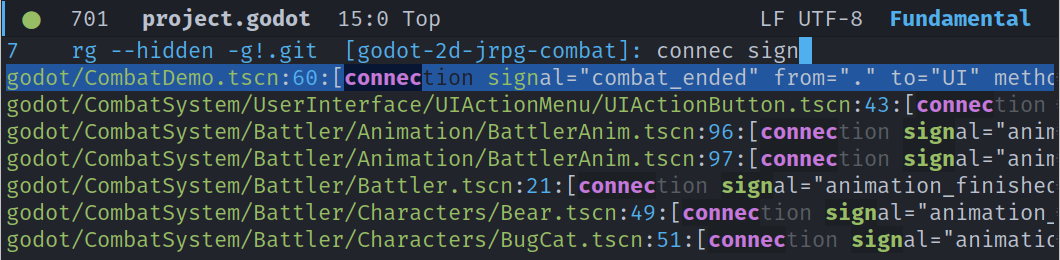
Ideally, we would have a tool that draws a diagram or outputs a list of signal connections in the entire project. Unfortunately, we don't have that at the moment.
With the guidelines above and by following other object-oriented design principles, we tend to encapsulate signals inside of scenes, limiting the need to map and track them around the project.
There's another reason we don't bother creating a diagram of signal connections by hand.
Game development is highly iterative and full of moving parts. It's the game's design and the game's feel that should dictate the code you write, for the most part. And because the game's design changes a lot, code tends to change a lot throughout a project.
Because of that, you can't strictly plan your code's structure ahead of time. Keeping track of all signal connections without a good tool to automate that process could waste time.
If we had a good tool to generate dependency diagrams, as you can find in more mature ecosystems, we'd certainly use it. In the meantime, due to the time it takes to maintain a diagram, we use code search. In practice, we haven't needed to track down signal connections too much. Most of the time, we found we only look at one or two to fix a specific bug.
A common question is whether emitting signals every frame is a problem for performance. In most cases, it is not, but it is worth thinking about when it starts to matter.
In GDScript, emitting a signal that nothing is connected to costs about as much as calling an empty function. When connected to one node, the emission plus the callback is about the cost of three of those function calls. It takes hundreds to thousands of signal emissions every frame before you start to see a measurable performance cost. For the occasional signal used to update a UI or decouple two systems, you are nowhere near that range.
That said, if you find yourself in a situation where you are emitting that many signals every frame, the problem is probably not performance, but rather the code structure. Signals work well for notifying other parts of your code that something happened. When you have hundreds of entities all emitting signals every frame to coordinate their behavior, you probably want a system that loops over those entities directly and updates them in batch from a centralized place.
If you are emitting signals every frame at that scale, you might as well poll every frame, which is simpler.
Don't stop here. Step-by-step tutorials are fun but they only take you so far.
Try one of our proven study programs to become an independent Gamedev truly capable of realizing the games you’ve always wanted to make.


Get help from peers and pros on GDQuest's Discord server!
20,000 membersJoin ServerThere are multiple ways you can join our effort to create free and open source gamedev resources that are accessible to everyone!
Sponsor this library by learning gamedev with us onGDSchool
Learn MoreImprove and build on assets or suggest edits onGithub
Contributeshare this page and talk about GDQUest onRedditYoutubeTwitter…
Site in BETA!found a bug?