Using Type Hints with Godot's GDScript
2018/09/04
- Type
- Learning Resource
- Format
- Tutorial
- Version
- Godot 3.x
- Subject Tags
- Code
- MIT
- Game Assets
- CC BY-NC-SA
- All else
- 2016-2026, GDQuest© - All rights reserved
- Created
- Updated
- 2018/09/04
- 2018/09/04
GDScript is getting optional typing syntax in Godot 3.1. In this guide, you'll learn:
Where and how you use this new language feature is entirely up to you: you can use it only in some sensitive GDScript files, use it everywhere, or write code like you always did!
Static types can be used on variables, constants, functions, parameters, and return types.
With typed GDScript, Godot can detect even more errors as you write code! It gives you and your teammates more information as you're working, as the arguments' types show up when you call a method.
Imagine you're programming an inventory system. You code an Item node, then an Inventory. To add items to the inventory, the people who work with your code should always pass an Item to the Inventory.add method. With types, you can force them to:
# in Item.gd
class_name Item

# in Inventory.gd
class_name Inventory

func add(reference : Item, amount : int = 1):
	var item = find_item(reference)
	if not item:
		item = _instance_item_from_db(reference)
	item.amount += amount
Another significant advantage of typed GDScript is the new warning system. From version 3.1, Godot gives you warnings about your code as you write it: the engine identifies sections of your code that may lead to issues at runtime, but lets you decide whether or not you want to leave the code as it is. More on that in a moment.
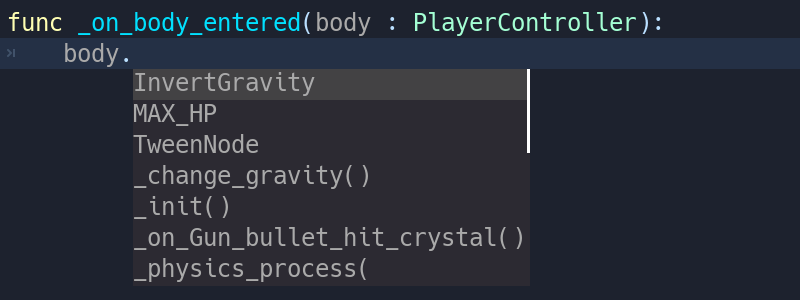
Static types also give you better code completion options. Below, you can see the difference between a dynamic vs. a static typed completion options for a class called PlayerController.
You've probably stored a node in a variable before, and typed a dot to be left with no autocomplete suggestions:

This is due to dynamic code. Godot cannot know what node or value type you're passing to the function. If you write the type explicitly, however, you will get all public methods and variables from the node:
In the future, typed GDScript will also increase code performance: Just In Time compilation and other compiler improvements are already on the roadmap!
Overall, typed programming gives you a more structured experience. It helps prevent errors and improves the self-documenting aspect of your scripts. This is especially helpful when you're working in a team or on a long-term project: studies have shown that developers spend most of their time reading other people's code, or scripts they wrote in the past and forgot about. The clearer and the more structured the code, the faster is it to understand, the faster you can move forward.
To define the type of a variable or a constant, write a colon after the variable's name, followed by its type. E.g. var health : int. This forces the type of variable to always stay the same:
var damage : float = 10.5
const MOVE_SPEED : float = 50.0
Godot will try to infer types if you write a colon, but you omit the type:
var life_points : = 4
var damage : = 10.5
var motion : = Vector2()
Currently you can use three types of... types:
You don't need to write type hints for constants as Godot sets it automatically from the assigned value. But you can still do so to make the intent of your code clearer.
You can use any class, including your custom classes, as types. There are two ways to use them in scripts. The first method is to preload the script you want to use as a type in a constant:
const Rifle = preload('res://player/weapons/Rifle.gd')
var my_rifle : Rifle
The second method is to use the class_name keyword when you create it. For the example above, your Rifle.gd would look like this:
extends Node2D
class_name Rifle
If you use class_name, Godot registers the Rifle type globally in the editor, and you can use it anywhere without having to preload it into a constant:
var my_rifle : RifleType casting is a key concept in typed languages. We call the conversion of a value from one type to another casting.
Imagine an Enemy in your game, that extends Area2D. You want it to collide with the Player, a KinematicBody2D with a script called PlayerController attached to it. You use the on_body_entered signal to detect the collision. With typed code, the body you detect is going to be a generic PhysicsBody2D, and not your PlayerController on the _on_body_entered callback.
You can check if this PhysicsBody2D is your Player with the as casting keyword, and using the colon : again to force the variable to use this type. This forces the variable to stick to the PlayerController type:
func _on_body_entered(body : PhysicsBody2D) -> void:
    var player := body as PlayerController
    if not player:
        return
    player.damage()
As we're dealing with a custom type, if the body doesn't extend PlayerController, the player variable will be set to null. We can use this to check if the body is the player or not. We will also get full autocompletion on the player variable thanks to that cast.
You can also use the is keyword to check if an object is of a certain type. But unlike casting, this doesn't change the type of the variable for Godot, so you may not benefit from autocompletion in the script editor, although this code is shorter than the one above:
func _on_body_entered(body : PhysicsBody2D) -> void:
    if not body is PlayerController:
        return
player.damage()You can also use casting to ensure safe lines. Safe lines are a new tool in Godot 3.1 to tell you when ambiguous lines of code are type-safe. As you can mix and match typed and dynamic code, at times, Godot doesn't have enough information to know if an instruction will trigger an error or not at runtime.
This happens when you get a child node. Let's take a timer for example: with dynamic code, you can get the node with $Timer. GDScript supports duck-typing, so even if your timer is of type Timer, it is also a Node and an Object, two classes it extends. With dynamic GDScript, you also don't care about the node's type as long as it has the methods you need to call.
You can use casting to tell Godot the type you expect when you get a node: ($Timer as Timer), ($Player as KinematicBody2D), etc. Godot will ensure the type works and if so, the line number will turn green at the left of the script editor.

You can turn off safe lines or change their color in the editor settings.
To define the return type of a function, write a dash and a right angle bracket -> after its declaration, followed by the return type:
func _process(delta : float) -> void:
    pass
The type void means the function does not return anything. You can use any type as with variables:
func hit(damage : float) -> bool:
    health_points -= damage
    return health_points <= 0
You can also use your own nodes as return types:
# Inventory.gd
# Adds an item to the inventory and returns it
func add(reference : Item, amount : int) -> Item:
	var item : Item = find_item(reference)
	if not item:
		item = ItemDatabase.get_instance(reference)
	item.amount += amount
    return item
Typed GDScript and dynamic GDScript can coexist in the same project. But I recommend sticking to either style for consistency in your codebase, and for your peers. It's easier for everyone to work together if you follow the same guidelines, and faster to read and understand other people's code.
Typed code takes a little more writing, but you get the benefits we discussed above. Here's an example of the same, empty script, in a dynamic style:
extends Node
    func _ready():
        pass
    func _process(delta):
        pass
And with static typing:
extends Node
    func _ready() -> void:
        pass
    func _process(delta : float) -> void:
        pass
As you can see, you can also use types with the engine's virtual methods. Signal callbacks, like any methods, can also use types. Here's a body_entered signal in a dynamic style:
func _on_Area2D_body_entered(body):
    pass
And the same callback, with type hints:
func _on_area_entered(area : CollisionObject2D) -> void:
    pass
You're free to replace, e.g. the PhysicsBody2D, with your own type, to cast parameters automatically:
func _on_area_entered(bullet : Bullet) -> void:
    if not bullet:
        return
    take_damage(bullet.damage)
The bullet variable could hold any CollisionObject2D here, but we make sure it is our Bullet, a node we created for our project.
If it's anything else, like an Area2D, or any node that doesn't extend Bullet, the bullet variable will be null.
The warning system complements typed GDScript. It's here to help you avoid mistakes that are hard to spot during development, and that may lead to runtime errors.
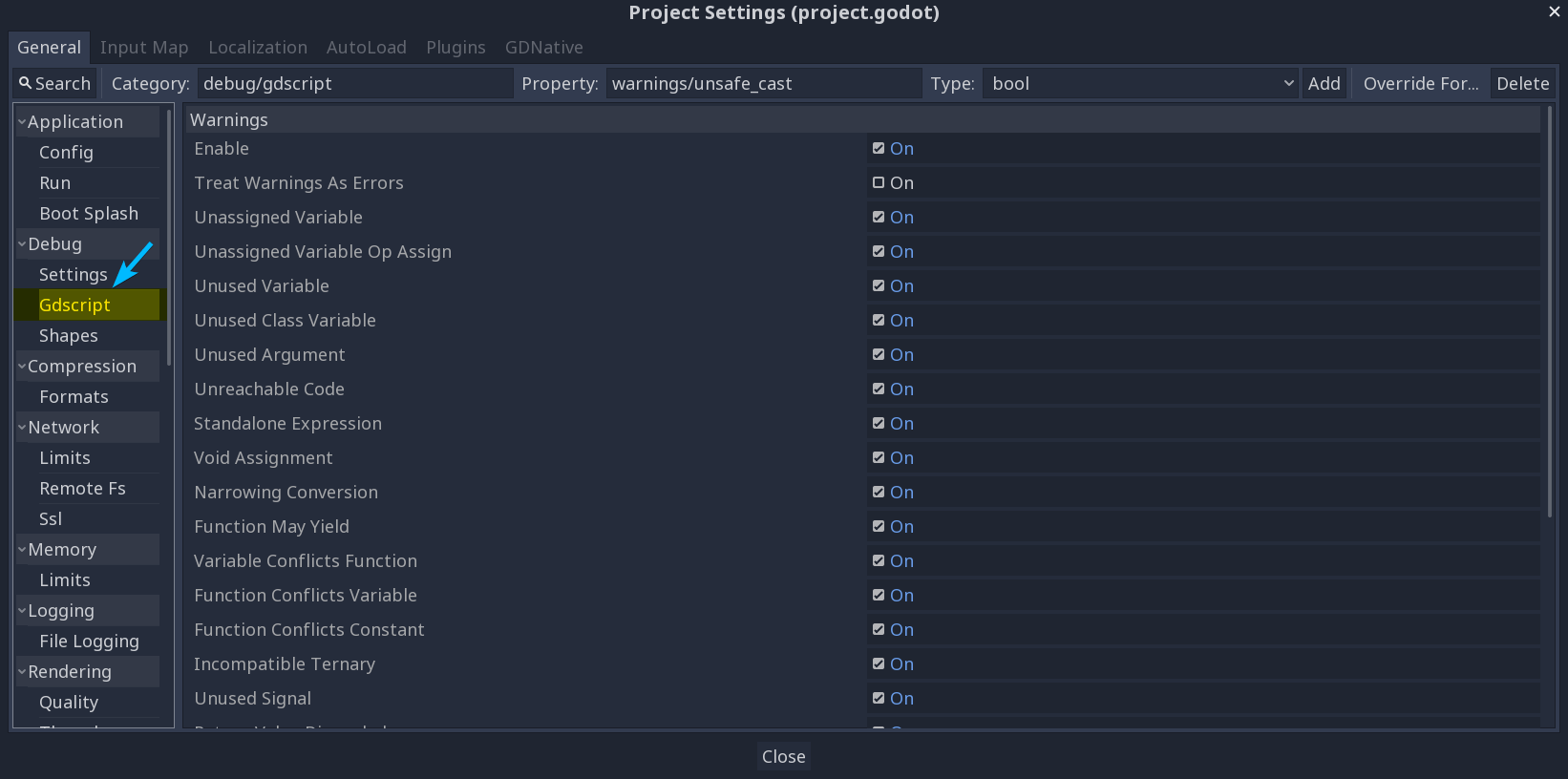
You can configure warnings in the Project Settings under a new section called GDScript:
You can find a list of warnings for the active GDscript file in the script editor's status bar. The example below has 3 warnings:
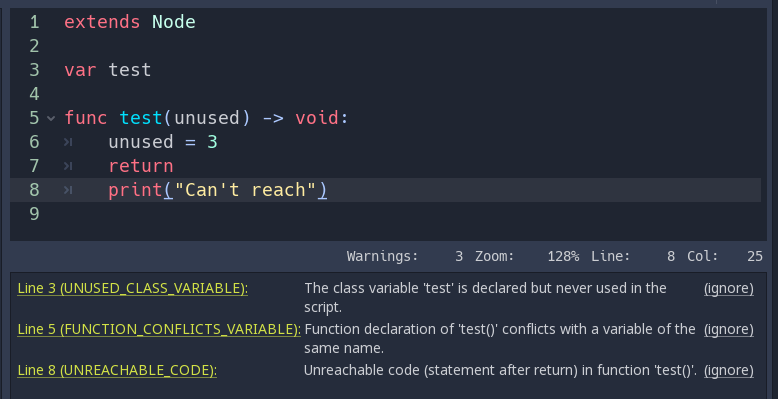
To ignore specific warnings in one file, insert a special comment of the form #warning-ignore:warning-id, or click on the ignore link to the right of the warning's description. Godot will add a comment above the corresponding line and the code won't trigger the corresponding warning anymore:
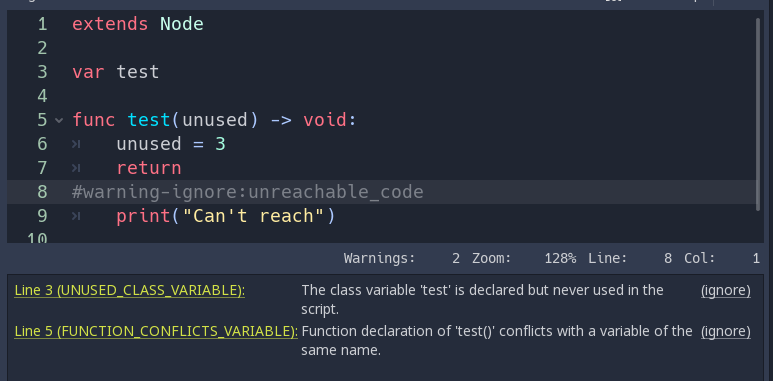
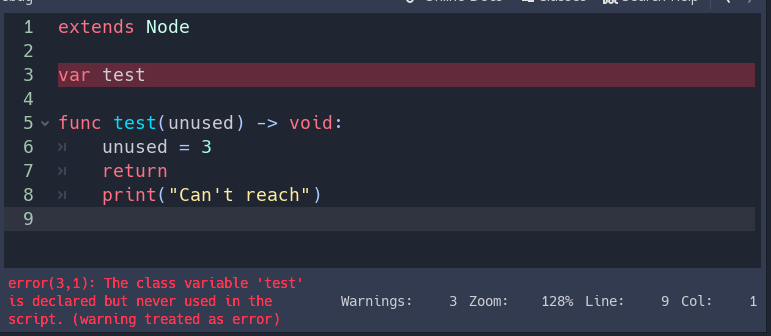
Warnings won't prevent the game from running, but you can turn them into errors if you'd like. This way your game won't compile unless you fix all warnings. Head to GDscript section of the Project Settings to turn on this option. Here's the same file as the previous example with warnings as errors turned on:
To wrap up this introduction, let's cover a few cases where you can't use type hints. All the examples below will trigger errors.
You can't use Enums as types:
enum MoveDirection { UP, DOWN, LEFT, RIGHT }
var current_direction : MoveDirection
You can't specify the type of individual members in an array. This will give you an error:
var enemies : Array = [$Goblin : Enemy, $Zombie : Enemy]You can't force the assignment of types in a for loop as each element the for keyword loops over already has a different type. So you cannot write:
var names ['John', 'Marta', 'Samantha', 'Jimmy']
for name : String in names:
    pass
Two scripts can't depend on each other in a cyclic fashion:
# Player.gd
extends Area2D
class_name Player

var rifle : Rifle
# Rifle.gd
extends Area2D
class_name Rifle
var player : PlayerTyped GDScript is a powerful tool. Coming with Godot 3.1, it can already help you write more structured code, help you avoid common errors, and create scalable systems. In the future, static types will also bring you a nice performance boost thanks to upcoming compiler optimizations.
Want to become a better game creator? Be sure to follow us on Twitter for more tutorials and news dedicated to game creation and Free Software!
Don't stop here. Step-by-step tutorials are fun but they only take you so far.
Try one of our proven study programs to become an independent Gamedev truly capable of realizing the games you’ve always wanted to make.


Get help from peers and pros on GDQuest's Discord server!
20,000 membersJoin ServerThere are multiple ways you can join our effort to create free and open source gamedev resources that are accessible to everyone!
Sponsor this library by learning gamedev with us onGDSchool
Learn MoreImprove and build on assets or suggest edits onGithub
Contributeshare this page and talk about GDQUest onRedditYoutubeTwitter…
Site in BETA!found a bug?