Object
2025/10/11
- Type
- Learning Resource
- Format
- Glossary Article
- Version
- General
- Subject Tags
- Code
- MIT
- Game Assets
- 2016-2026, GDQuest© - All rights reserved
- All else
- 2016-2026, GDQuest© - All rights reserved
- Created
- Updated
- 2026/10/21
- 2025/10/11
In computer programming, an object is like a little machine with its own data and functions to operate on that data. For example, a coffee machine can hold water and coffee beans (data) and make coffee (function). A car can hold fuel and people (data) and drive (function).
It's an abstract concept at the core of many programming languages.
An example of an object in a Godot game is the player character. It can have health, movement speed, and an inventory (data), and it can move, jump, attack, and take damage (functions).
In Godot, an object is your game's most basic building block. Every node is an object. So, typically, from players and enemies to menus and visual effects, you will use objects for many things in your projects.
Note for experienced developers: Using nodes and objects is optional in Godot. Under the hood, the engine uses a lot of data-oriented code for performance. You can bypass nodes and objects and use data-oriented code directly if you need to.
As mentioned, objects bundle data and functions. In programming, we call this data properties (or member variables) and the functions methods (or member functions).
In the GDScript programming language, properties include all the variables you define outside of functions around the top of your script. For example, we mentioned how a player object might have data like health, speed, or inventory. You could define these properties like so:
extends CharacterBody2D

var health := 100
var speed := 500.0
var inventory := []
Methods (or member functions) are functions you define inside a script. For example, a player object might have methods like move(), jump(), or take_damage():
extends CharacterBody2D

func move():
	# ...

func jump():
	# ...

func take_damage(amount):
	# ...
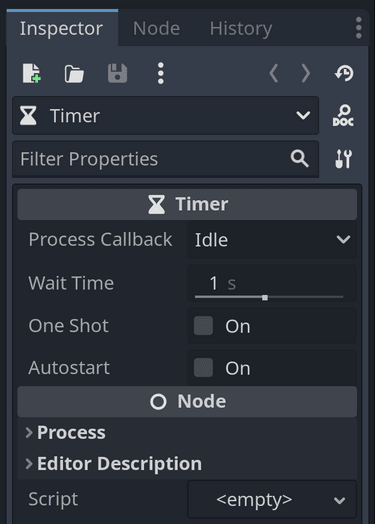
The two examples above show how you can define properties and methods in a script. On top of that, Godot provides many properties and methods defined in the Godot engine. When you select a node in the editor, you can see all its properties in the Inspector dock on the right.
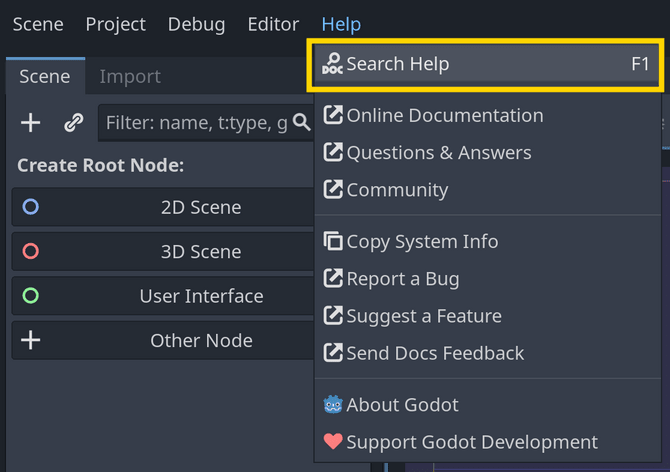
You can also find all the nodes, their properties, and their methods in the Godot code reference by going to Help -> Search Help in the editor or by pressing f1 (on Mac: ⌥space).
Don't stop here. Step-by-step tutorials are fun but they only take you so far.
Try one of our proven study programs to become an independent Gamedev truly capable of realizing the games you’ve always wanted to make.


Get help from peers and pros on GDQuest's Discord server!
20,000 membersJoin ServerThere are multiple ways you can join our effort to create free and open source gamedev resources that are accessible to everyone!
Sponsor this library by learning gamedev with us onGDSchool
Learn MoreImprove and build on assets or suggest edits onGithub
Contributeshare this page and talk about GDQUest onRedditYoutubeTwitter…
Site in BETA!found a bug?